
What IDOC Covers Statewide
IDOC stands for the Idaho Department of Correction. Its Resident/Client Search reaches everyone under the agency's jurisdiction. That means people in prison and people on probation or parole. The database covers felony cases where a person is serving time, according to the agency. That scope is narrower than people assume. So the locator answers state sentence and supervision questions. It is not a statewide arrest list. A fresh arrest often sits only in a county or city system, because state jurisdiction does not attach at the moment of arrest.
The split matters when one name shows up in several systems. County jail records hold local booking and custody. IDOC tracks state custody or community supervision. Someone can move from a county jail to state prison after sentencing, but the county booking entry and the IDOC profile describe different events. A court case shows filed charges and outcomes. The court file supplies the final legal result. Use the system that matches the question you are asking.
Search the IDOC Resident/Client Record
The official IDOC Resident/Client Search is the place to look for anyone under state correctional jurisdiction. A last name or an IDOC number starts the search. The first name is optional. Adding it helps when a surname is common. Partial entries are allowed, though each field has a minimum length. Do not rely on one name alone. A match should be checked against details you already know.
The official form lays out the search boxes and spells out the partial-match rules. It shows a search interface, not photos.
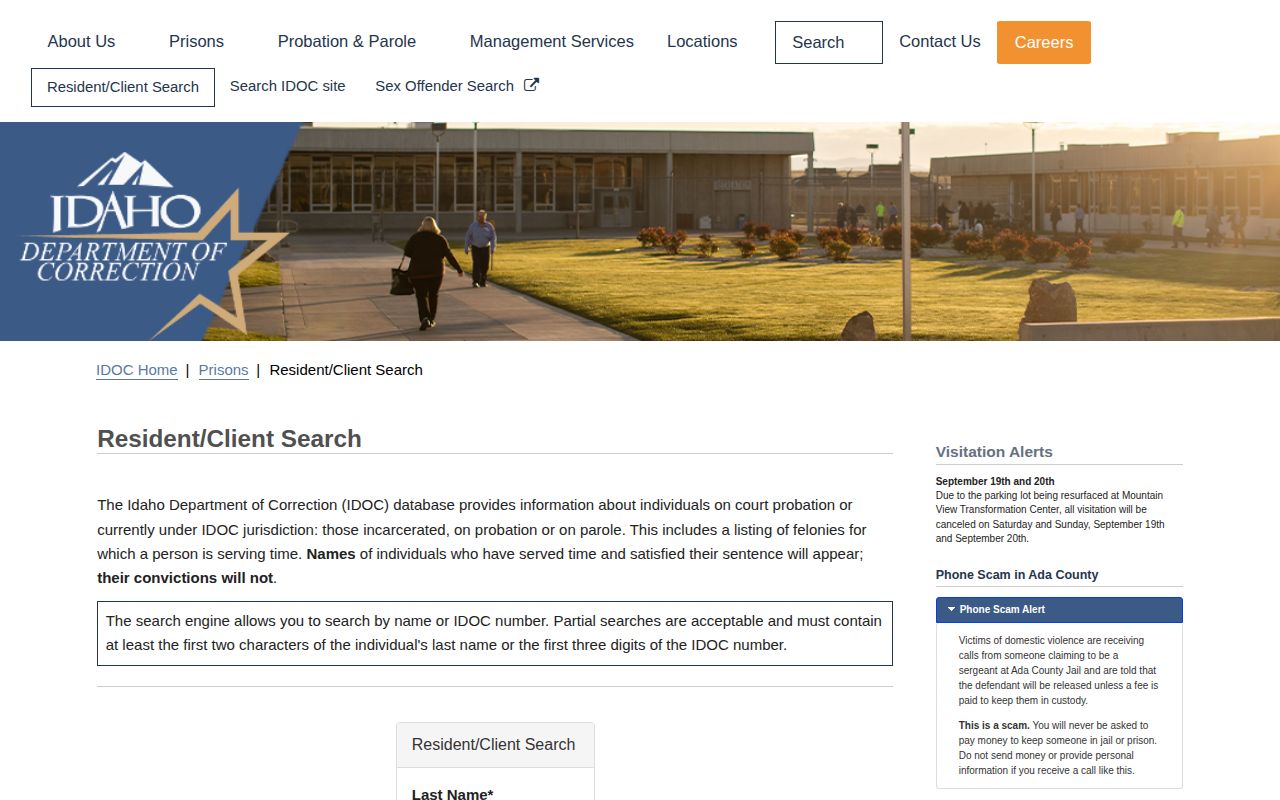
The form asks for a last name or IDOC number. Add a first name to separate people with similar names.
- Open the IDOC Resident/Client Search from the department’s official site.
- Enter a last name, or use the IDOC number if it is known. A partial last name needs at least two characters.
- For a partial IDOC number, enter at least three digits. Add a first name only when useful.
- Review the list for the IDOC number, name, birth year, and status. Do not treat a similar name as a confirmed match.
- Select the linked IDOC number when available to open the profile and read its sentence or supervision details.
- Check the “data current as of” line and the agency’s update warning before relying on a status or location.
A search result is a locator entry, nothing more. A missing name proves very little. It does not mean release, and it does not mean the person left Idaho. The person could be in county, federal, immigration, or another state's custody, or simply outside IDOC jurisdiction. Spelling and numbers can mismatch too.
Fields on the IDOC Search Results
Results list a short set of fields. A linked profile can hold more detail about a state sentence or supervision record. These fields are not a county booking sheet. Read them as state-system facts, not as the full story of an arrest or court case.
| Field | Where it appears and what it means |
|---|---|
| IDOC number | Appears in the result list and links to a profile when available. It is the department’s identifier, not a county booking number. |
| Name and birth year | The result list can show last, first, and middle name plus birth year. Compare the whole entry before treating it as a match. |
| Status | The result can show in custody, in community, active bench warrant, or discharged with a date. Read the label and any date together. |
| Age and location | A detail profile can show age and a current mailing or supervising location. IDOC warns that location data may not be the latest. |
| Offense and case | The linked record can show the offense, sentencing county, and case number. Use the court case for filings and the final disposition. |
| Sentence and supervision dates | Profiles may show sentence status, a supervision date, sentence-satisfaction date, and sometimes parole dates. |
The fields answer different questions. An IDOC number ties the result to a correctional profile. A sentencing county points toward the court case. A supervision date describes state oversight. A discharge date marks a former entry. None of these matches an arrest date or a county booking number.
IDOC Status and Daily Updates
IDOC updates the search data daily. The agency still cautions that information can change fast. A profile can lag on the latest location, status, or scheduled termination date. Read the "data current as of" line first. Daily updates cover the whole database, not a promise that every field changes at once.
The official results page shows a status column. It sits next to IDOC number, name, and birth year. Sample entries there carry in-custody, community, active-bench-warrant, and discharged labels.
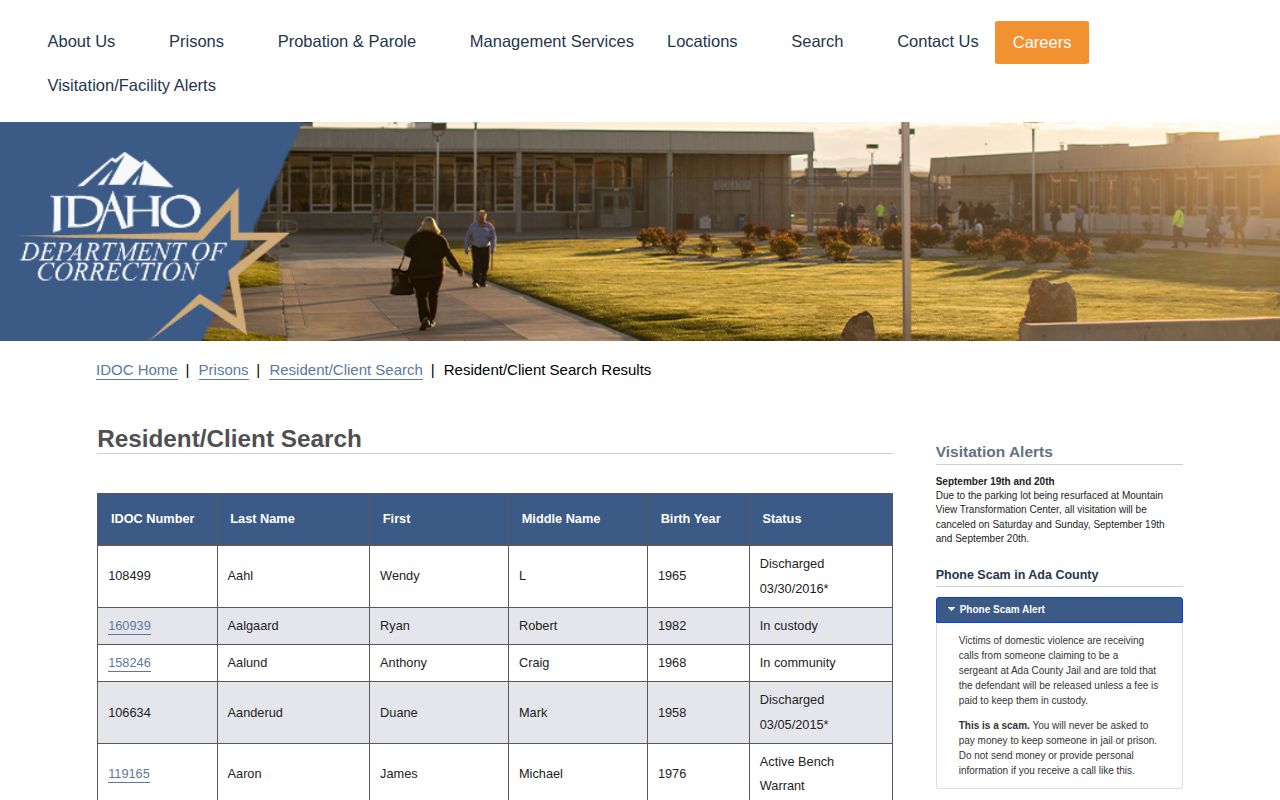
Status is the key context. It separates current state custody from community supervision or a discharged record. The result list shows no booking photographs.
"In custody" means the person is held under IDOC jurisdiction as the locator reports it. "In community" covers probation, parole, and similar statuses rather than a county jail stay. "Active bench warrant" is a warrant tied to the state record. It is not a new arrest entry. A discharged label with a date marks a past state record, not present incarceration.
Can a daily update guarantee a current location? No. IDOC itself warns that location and status can lag behind a change. Confirm time-sensitive custody questions with the responsible agency. An old result proves nothing about today.
Note: A result marked current as of a given date can still fall short if custody or supervision changed after that update.
Former IDOC Names Remain Searchable
A name can stay in IDOC's Resident/Client Search long after a sentence ends. The department calls this intentional. A person who served time and satisfied the sentence may still appear by name. The conviction does not appear in that entry. A discharged record can carry a discharge date and an asterisk. That result is not proof of current custody. Nor is it a new arrest.
So read the status line, any discharge date, and the agency's note together. Do not recast a past sentence as a fresh booking. If a case outcome is unclear, the court file and the closing order are the place to look. A court record may show more, subject to its own access rules.
The IDOC entry is not a full public case history. Names stay searchable. Convictions can drop out. Visibility in one system says nothing about visibility in another. Photos are a separate matter. The public search and detail interfaces show no image field. They list no photo-update schedule either. An agency-held photo would take a separate records request.
Note: The IDOC results page can keep a discharged name while omitting the conviction, so pair any date and status with the description.
IDOC Mugshots: Status, Not Photos
The official search shows status, not faces. Idaho's public Resident/Client Search offers text fields and state status information. The results page and detail view follow the same pattern. None of them exposes an offender photo, an image URL, or a photo-bearing profile. So IDOC is the right place to check custody and supervision status. It is not a public photo database.
Does the public IDOC search publish offender photos? No photo appears in the search results or the detail view. Calling the page a mugshot gallery would be wrong. It is not a current prison-photo source either.
With no image on display, the search instructions set no public photo-update policy. The daily update note covers status and location only. Idaho posts no online retention or removal schedule for offender photos. A specific image request may get reviewed. Release still cannot be promised.
For an agency-held record, use the IDOC public-records portal and name the exact record sought. Say whether it concerns a profile, a status record, or a photograph. Add any identifiers that help. IDOC may review the request under Title 74. Its rules also protect security, victims, witnesses, or rehabilitation interests. A private webpage may claim to show an "IDOC mugshot." That page is not an official IDOC photo source.
Request IDOC Records Under Title 74
When the online result comes up empty, IDOC points requesters to its public-records portal. Idaho's Public Records Act favors access. Exemptions still apply. A narrow request for one named record is easier to review than a broad sweep for many people's records or images.
- Open the IDOC portal and choose a public-records request.
- Describe the exact record sought, such as a particular status record or a dated document. Add a known name, IDOC number, or case number to help locate it.
- Ask for the public portion if a record may contain protected information. Idaho law calls for release of non-exempt material when it can be separated from protected content.
- Review any response about access, redaction, timing, or cost. If a record is withheld, ask which legal basis applies and whether another part can be released.
- For case filings or a certified court record, contact the clerk or use the court’s records route. IDOC is not the custodian of every court document tied to a sentence.
The Attorney General's statewide guidance sets response clocks. Idaho residents may wait up to ten working days for an answer. Nonresidents can wait up to thirty-five days. Extensions are permitted by law. Those deadlines govern a response, not a promise that the full file arrives that fast. Residents get the first two hours of processing and the first one hundred pages free. Further fees may apply under the statute. Ask IDOC about costs for your specific request.
Access has limits. Disclosure can be withheld when it would interfere with enforcement, affect a fair trial, reveal an investigative source or method, endanger a person, or expose protected personal information. Some juvenile and sensitive records carry protection too. An agency may redact those parts and release the rest. The Idaho Code sections on records exempt from disclosure and investigatory records describe the limits, and the Attorney General's public-records guidance covers request and response rules.
Note: A request for an IDOC file should name the state record, since county booking records and court documents sit with different custodians.
IDOC or County Booking Photos?
Match the record path to the event itself. Idaho Code §20-601 puts booking duties at the county jail stage. The required items include the photograph and fingerprints. The law does not force counties to post every booking image online. Local rosters and feeds differ. A missing photo on one county page does not prove no booking record exists. The Idaho mugshot-law explanation separates the booking requirement from any publication mandate.
| Record source | What it can answer | When to use it |
|---|---|---|
| County sheriff or jail | Local booking, custody, and the county-held booking photo, subject to that agency’s public-record rules. | Someone was recently arrested or held in a county jail. Use the Idaho County Directory to reach the local record path. |
| IDOC Resident/Client Search | State prison, probation, parole, or a discharged state record. The public page reviewed did not show offender photographs. | A person may be under Idaho state correctional jurisdiction or supervision. |
| Idaho iCourt and clerk | Filed trial-court cases, hearings, and public case outcomes, subject to sealed and restricted records. | The question concerns the charge, plea, judgment, sentence, dismissal, or other disposition. |
Idaho law puts a photo inside county-jail booking. Under §20-601, intake means fingerprints and a picture. The statute covers intake only, so online release is a separate question governed by the Public Records Act and its exceptions. A blank county page is not the end. Ask the arresting agency or the jail's records custodian for the booking record and any image the jail kept. Keep the two systems straight. An IDOC profile is not a county booking record, and a county roster does not prove a state sentence. For a fresh county arrest, call the county. For state supervision use IDOC, and for a court outcome search iCourt or ask the clerk.
Note: Idaho's booking-photo requirement applies at county-jail intake, while online release remains a records and agency-policy question.
Court and Federal Records Stay Separate
Prison files and court files are different things in Idaho. The Idaho iCourt Portal is the statewide entry point for trial-court case information, hearings, payments, and register-of-actions entries. Deeper copies take a request. The Idaho Supreme Court records guidance says case records and copies may require a request to the clerk or review at a courthouse kiosk. Start with the case number on an IDOC profile. Then pull the actual court entry and read the filed charge and disposition for yourself.
Sealed records and restricted documents may never surface in a name search. A blank screen proves little. Ask the clerk. When an online entry looks incomplete, request a complete or certified record from the court. IDOC adds its own wrinkle, since a discharged name can stay searchable while the conviction itself goes unlisted.
Federal custody runs on separate systems too. The Federal Bureau of Prisons locator finds people in federal prison by name or register number. It shows federal status and location information. The ICE detainee locator covers current immigration detention. You can search it with an A-number or exact biographical information. Neither tool mirrors an Idaho county arrest roster. Neither offers a public photo field.
Some federal pretrial detainees sit in contract county facilities under U.S. Marshals Service custody. The county report may show a federal hold. It rarely carries the federal case record itself. The District of Idaho case-information page explains the federal route, and the U.S. Marshals prisoner-photo policy explains the limits on public federal booking photographs. Let each system answer its own question.
Terms Used in an IDOC Profile
Each label points to a different event. Keep state custody apart from the arrest record and the court outcome.
- IDOC number
- The Department of Correction’s identifier for a person in its system. It is not the booking or court case number.
- In custody
- A status label showing the person is held under IDOC jurisdiction in the locator data.
- In community
- A state supervision status outside prison, such as probation or parole.
- Discharged
- A former IDOC record with a discharge date. It does not mean current prison custody.
- Disposition
- The court’s result in a case, such as a dismissal, acquittal, plea, or judgment.
- Sentence satisfied
- The point IDOC identifies as completion of the sentence. The name may still appear even when the conviction does not.
A status term means nothing alone. A county roster answers local custody. An IDOC status describes state correctional jurisdiction, while a court disposition shows how a filed case ended. Keeping them separate keeps the record honest.